
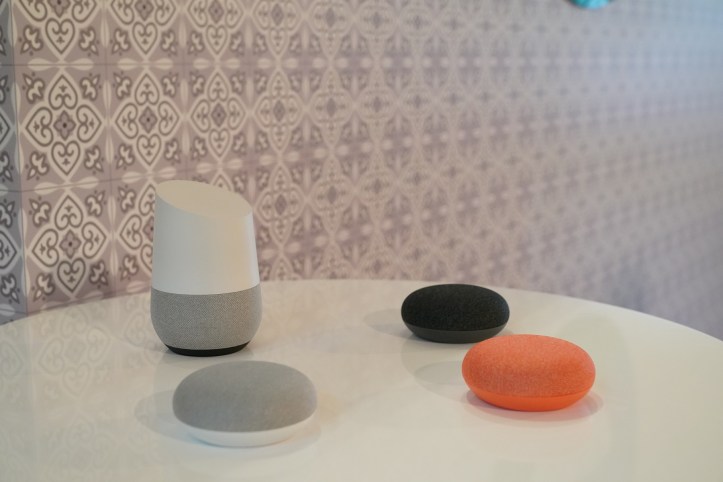
Google Home / SGD 189
Google Home Mini / SGD 79
Available at: Google Store, StarHub, Challenger and COURTS
- Meet your Google Assistant
Ask it questions. Tell it to do things. The Google Assistant is built into Google Home and Google Home Mini. Just start with “Hey Google” and it’s ready to help you get things done. It’s like your home just transformed into your own personal assistant. Best of all, it understands Singaporean English, so made-in-Singapore terms like kopitiam, Paya Lebar, or MRT won’t be lost on the Google Assistant. As the Google Assistant adds functionality over time, Google Home will automatically update its software so you don’t have to lift a finger while it keeps getting better.
- Get hands-free help around the house so you can focus on things that matter
Find answers instantly from your Google Assistant by using your voice. Whether it is searching for recipes or unit conversions in the kitchen while cooking, singing along to your kids’ favourite lullaby, or getting translations and calculations while you are hard at work, the Google Assistant lends you an extra pair of hands to find the information you’re curious about, when you need it.
- Voice Match makes it truly your personal Assistant
The Google Assistant recognises your voice and up to five others in your home, so that you can each get a personalised experience. Just set up Voice Match on the Google Home app. Then, when you ask your Assistant to pull out your favourite playlist on Spotify, it brings up your favourite songs. Your reminders are just for you too. So you won’t forget to wish your grandma a happy birthday, or buy groceries at the supermarket.
- Enjoy music, radio, TV shows, local news and audiobooks
With a simple voice command, play songs, playlists, artists, and albums from your favourite music platforms like Spotify and YouTube. You can ask “Hey Google, play some workout music” to add more oomph to your home workouts. Listen to your local radio stations with TuneIn Radio, or catch the latest news hot off the press from local news providers such as Channel NewsAsia, The Straits Times, The Business Times, MONEY FM 89.3 and Business Insider Singapore. You can even cast your favourite shows on Netflix by asking “Okay Google, play Stranger Things on my TV” when you have Chromecast plugged in or built-in to your TV. Bedtime reading just got easier with the Assistant. Just say “Hey Google, read my book” to listen to your favourite audiobook hands-free with the Google Home.
- Control devices around your home
Use Google Home to control and connect your home by voice, including speakers, lights, and other smart devices. You can control your lights and switches from popular home automation systems including Philips Hue and TP-Link allowing you to dim the lights in the living room, turn on the fan or turn off the coffee machine.
- Tackle your day
With your permission, your Google Assistant gets to know what matters to you. Easily ask for your travel itinerary, your daily schedule, traffic to work, and more. Just say, “Okay Google, tell me about my day” and you’ll get up to speed on things like the weather, your calendar, and a news briefing from a source of your choice. Get it to even remember things for you, such as where important documents are located by asking “Hey Google, remember that my passport is in the top drawer in the study”.
- Designed for effortless voice control and high quality audio that works in any space
Google Home and Google Home Mini pack powerful sounds for their compact sizes. They are thoughtfully designed to deliver crystal-clear sound that streams over Wi-Fi. They can also hear you reliably from anywhere across the room when you say “Okay Google” — even while playing music — thanks to far-field microphones and Google’s natural language processing. Best of all, its clean design makes it a perfect complement to any room.
- Use Google Home throughout your house
Google Home devices work better together. Enjoy the Multi-room mode by grouping Google Home devices together (with Chromecast Audio, Chromecast built-in and Bluetooth® speakers) to listen to the same song in every room. And with more than one device, you don’t need to worry about all of them responding when you say, “Okay Google” — if they have the same user account, only the closest one will respond. Need help getting the kids to school on time? Beat the daily morning rush and say “Okay Google, broadcast “Time to catch the school bus,” and your Assistant will play that message on all other Google Home devices in every room. And if you want to amp up your sound you can connect your Home device with other Bluetooth speakers and control them with your voice.
- Fun for the whole family
The Home devices are packed with fun for the entire family. Test your family’s knowledge by answering quick fire questions by asking “Hey Google, let’s play Lucky Trivia!” Be sure to look out for questions specific to Singapore such as “Is the Singapore Flyer taller than the London Eye?”, “Which is the longest expressway in Singapore?” or “Which popular hawker centre was operated out of a carpark in Orchard Road in the 1970s?”.
- Your Assistant at home and on the go
Your Assistant is always there, ready to help. With your Assistant on Home and phones, you’ll enjoy a seamless experience no matter where you go. Set a reminder on Home, and you’ll get it at the right time – whether you’re in the house or out and about. You can simply say “Hey Google, add soy milk to my shopping list” and your Google Home will remember that for you. When you’re at the supermarket, just whip out your phone and ask your Google Assistant to “Show me my shopping list”.
Soon, Google Home and Google Home Mini will be open to more third party apps for the Assistant, giving you access to more of your favourite services and content.
Check out more features and commands at g.co/home/explore
 LUXURY ASIA, PREMIUM TRAVEL, LIFESTYLE, TECH, WINE & DINE MAGAZINE
can google home talk in other languages?